

The memberOf rule operator in Microsoft Entra ID stops functioning after 3 November 2026, and the failure mode is silence. Dynamic membership groups, dynamic administrative units and entitlement management auto-assignment policies that use it will not throw an error or disappear. They will simply hold their 3 November membership forever, so leavers keep access and joiners never get it. An outage gets noticed in minutes. A frozen access model gets noticed at an audit.
Here’s what you should do before November 3.
What did memberOf actually do?
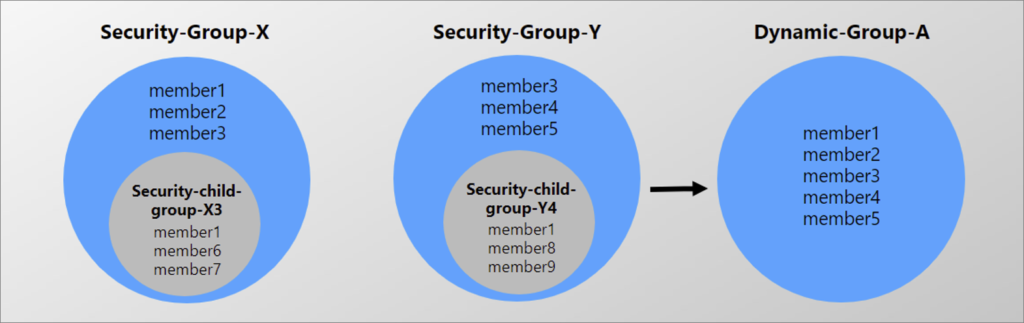
The preview let a dynamic group rule pull in the members of other groups:
user.memberOf -any (group.objectId -in ['<groupObjectId1>', '<groupObjectId2>']) It was the closest thing Entra ID had to nested groups that downstream services could read. Organisations used it to flatten a group hierarchy into something SharePoint, Teams, Conditional Access and group-based licensing could consume, because nesting has never worked cleanly for those consumers.
Microsoft's stated reason for pulling it is scale. During the preview, memberOf was observed to slow dynamic membership processing across an entire tenant, not just for the groups using it. The alternative might be in development, but nothing is releasing yet.
What will break, and where will you feel it first?
Frozen membership propagates into everything downstream of the group:
- SharePoint and Teams access. Leavers keep site and channel access. Joiners never get it.
- Conditional Access targeting. New employees fall outside a policy scope they should be inside. Your MFA or device compliance policy silently stops covering people.
- Group-based licensing. New starters go unlicensed. Departures keep consuming licences you pay for.
- Access packages. Auto-assignment policies stop assigning and stop removing, so a time-bounded grant quietly becomes permanent.
- Dynamic administrative units. Delegated admin scope drifts away from the org chart.
For regulated organisations there is a second-order problem. If your access control procedure says membership is maintained automatically by an attribute-driven rule, and that rule has silently stopped evaluating, your documented process and your actual system state have diverged. That is an audit finding, and it is hard to bound afterwards. You have to prove who had access to what, and for how long.
Which parts of the tenant do people forget to check?
Almost everyone checks dynamic groups. Two other surfaces carry memberOf rules and almost nobody checks them:
- Dynamic administrative units. Configured once by someone on the identity team, never touched again, and invisible during a normal access review. When one freezes, delegated admin scope stops tracking the org chart.
- Entitlement management auto-assignment policies. The rule lives inside the policy's allowed-targets configuration rather than on a group object, so a group-focused export misses it entirely.
Both need Microsoft Graph to enumerate properly. Neither shows up if you search only the Groups blade in the admin center.
The detail almost everyone misses: some of your memberships are already frozen
Here is the finding that changes how you prioritise, and it comes straight from the preview's documented limitations.
- memberOf never removed members when a source group was deleted, or when a member was removed from a source group. The documentation states it plainly: affected users remain members of the memberOf group until the rule is modified.
Read that against the retirement notice. It means the 3 November freeze is not the start of your drift. If any source group referenced in one of your rules has been deleted, or has had members removed, some of your access is already stale today, and has been for as long as that source group has been gone.
This is why a memberOf discovery exercise should resolve every source group ID in every rule and check whether it still exists. An unresolvable source group ID is not a data-quality annoyance, but a marker for access that stopped tracking reality some time in the past. That is exactly the kind of thing you would rather find yourself, than have found for you during an audit.
How do you decide what to do with each rule?
There are three honest outcomes, and a fourth that people avoid naming.
Rewrite with supported operators. If the source groups correspond to a real attribute, such as department, job title, company name or an extension attribute, express the rule against that attribute directly. That could be considered the best outcome, and it usually forces an overdue conversation about HR data quality.
Convert to assigned membership. Freeze the membership deliberately and manage it through your joiner/mover/leaver process. It is boring, auditable, and honest about who owns the list.
Delete the rule. A meaningful share of preview-era groups turn out to serve nothing.
Accept that some groups need a live union. This is the one people skip.This is the one people skip. If a group's membership only consists of all members in other groups, there is no attribute that expresses that. If it has to stay current, then assigned membership is not a migration.
How do you test a rewrite before you apply it?
You want both your coverage and precision to be at 100%, but most migration plans only track coverage.
Coverage is the share of current members the proposed rule still includes. Coverage below 100% means people lose access at cutover. You will hear about it the same morning.
Precision is the share of the proposed rule's population that is a current member. Precision below 100% means people gain access at cutover. Nobody reports that, which is exactly why it is the dangerous one.
A rule at 100% coverage and 80% precision looks like a clean migration on the day and is a silent over-grant forever after. When we built our own assessment tooling, we made precision the blocking threshold rather than coverage: the tool will not propose a rewrite that widens access, but it will happily propose one that leaves you a named list of eight people to add back by hand. A short manual task beats an invisible permission expansion.
Whichever way you compute it, validate the candidate rule in the Entra portal before applying it, and compare membership before and after.
A 3-step approach
Step 1: find every use. Export dynamic groups and search the rules for memberOf. Do the same for dynamic administrative units and entitlement management auto-assignment policies via Graph. For each hit, record what consumes it: sites, teams, Conditional Access policies, licence assignments, access packages. The migration risk lives in the consumers, not the group object. If you need certainty and help, get in touch for a free assessment.
Step 2: decide per group. Note the constraint that pushed people to memberOf in the first place: it could never be combined with other rules or operators. So a rewrite is rarely a like-for-like translation. It is a chance to express the intent properly.
Step 3: validate and document. Compare membership before and after, confirm the downstream consumers still resolve, record the change. Under GxP, NIS2 or DORA the validation evidence is the deliverable. Leave buffer before 3 November. You do not want the last group migrated on the last day.
Working with memberOf groups in a regulated environment?
We run a read-only assessment of your tenant and hand you the register, the per-group recommendation and the validation plan. Get In touch
Ulrich Bojko
Head of Development